# User Guide

## Hardware Overview

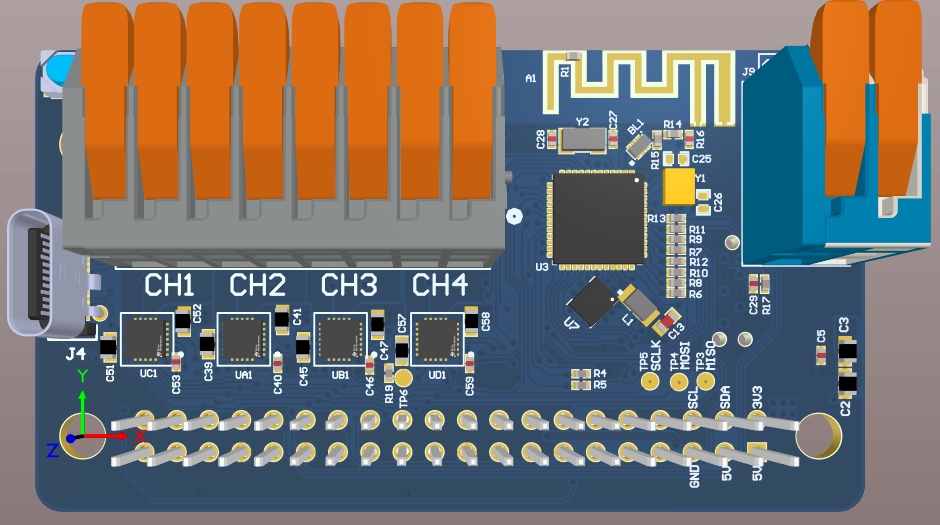
<figure><img src="https://content.gitbook.com/content/tpXGY8yRGIrUmuuiav4P/blobs/nmLl2pKhr2DgGCDoPKRn/image.png" alt=""><figcaption><p>RoverHatGen2 (Top)</p></figcaption></figure>

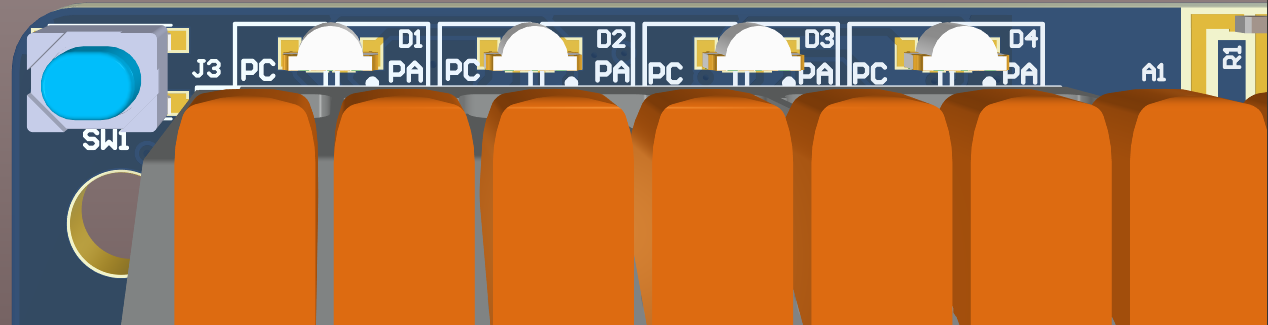
<figure><img src="https://content.gitbook.com/content/tpXGY8yRGIrUmuuiav4P/blobs/IC8jUGaKHPW3ZnqCkdP0/image.png" alt=""><figcaption><p>RoverHatGen2 LEDs (D1-D4) and pushbutton (SW1). The silk screen denotes the phase of each motor channel with <em>PA</em> and <em>PC</em></p></figcaption></figure>

## BLE Role Selection

The device boots as a BLE <mark style="color:blue;">Central</mark> device after POR by default. D1 will be <mark style="color:blue;">BLUE</mark>.

<mark style="color:yellow;">Press and hold push button (SW1)</mark> during POR to boot as a BLE <mark style="color:green;">Peripheral</mark> Device. D1 will be <mark style="color:green;">GREEN.</mark>

## BLE Central Role

### LED States

| RGB1                                  | RGB2                                  | RGB3                                  | RGB4                                                                          | State          |
| ------------------------------------- | ------------------------------------- | ------------------------------------- | ----------------------------------------------------------------------------- | -------------- |
| <mark style="color:blue;">BLUE</mark> | OFF                                   | OFF                                   | OFF                                                                           | Idle           |
| <mark style="color:blue;">BLUE</mark> | <mark style="color:blue;">BLUE</mark> | OFF                                   | OFF                                                                           | Scanning       |
| <mark style="color:blue;">BLUE</mark> | <mark style="color:blue;">BLUE</mark> | <mark style="color:blue;">BLUE</mark> | OFF                                                                           | Paired         |
| <mark style="color:blue;">BLUE</mark> | <mark style="color:blue;">BLUE</mark> | <mark style="color:blue;">BLUE</mark> | <mark style="color:blue;">BLUE</mark> <mark style="color:green;">GREEN</mark> | Bond Saved     |
| <mark style="color:blue;">BLUE</mark> | <mark style="color:blue;">BLUE</mark> | <mark style="color:blue;">BLUE</mark> | <mark style="color:blue;">BLUE</mark>                                         | Encrypted Pair |

## BLE Peripheral Role

### LED States

| RGB1                                    | RGB2                                    | RGB3                                    | RGB4 | State       |
| --------------------------------------- | --------------------------------------- | --------------------------------------- | ---- | ----------- |
| <mark style="color:green;">GREEN</mark> | OFF                                     | OFF                                     | OFF  | Idle        |
| <mark style="color:green;">GREEN</mark> | <mark style="color:green;">GREEN</mark> | OFF                                     | OFF  | Advertising |
| <mark style="color:green;">GREEN</mark> | <mark style="color:green;">GREEN</mark> | <mark style="color:green;">GREEN</mark> | OFF  | Paired      |

### Unsolicited Data Characteristic

This characteristic is used to send telemetry data to the host via BLE notifications. Each 20-byte notification has the following format:

| Byte |     Field    |                                      Description                                     |
| :--: | :----------: | :----------------------------------------------------------------------------------: |
|   0  |   Packet ID  |                     Describes the contents of the Data Byte Field                    |
|   1  | Packet Index | Rolling counter. Packets with equal Packet Indices are from the same sample interval |
|   2  |  Data Byte 0 |                              Refer to dedicated section                              |
|  ... |              |                                                                                      |
|  19  | Data Byte 17 |                                                                                      |

{% hint style="info" %}
*Unsolicited Data* notifications will be sent out at a rate of 1 Hz. Frames with equivalent *Packet Indices* will have an inter-frame delay of 100 ms between them.
{% endhint %}

#### Packet ID 1 Data Bytes

This packet contains the raw IMU data and TOF distance measurement in mm (if active).

<table><thead><tr><th align="center">Byte</th><th width="249" align="center">Description</th><th align="center">Type</th></tr></thead><tbody><tr><td align="center">0</td><td align="center">Accel X LSB</td><td align="center">int16</td></tr><tr><td align="center">1</td><td align="center">Accel X MSB</td><td align="center"></td></tr><tr><td align="center">2</td><td align="center">Accel Y LSB</td><td align="center">int16</td></tr><tr><td align="center">3</td><td align="center">Accel Y MSB</td><td align="center"></td></tr><tr><td align="center">4</td><td align="center">Accel Z LSB</td><td align="center">int16</td></tr><tr><td align="center">5</td><td align="center">Accel Z MSB</td><td align="center"></td></tr><tr><td align="center">6</td><td align="center">Gyro X LSB</td><td align="center">int16</td></tr><tr><td align="center">7</td><td align="center">Gyro X MSB</td><td align="center"></td></tr><tr><td align="center">8</td><td align="center">Gyro Y LSB</td><td align="center">int16</td></tr><tr><td align="center">9</td><td align="center">Gyro Y MSB</td><td align="center"></td></tr><tr><td align="center">10</td><td align="center">Gyro Z LSB</td><td align="center">int16</td></tr><tr><td align="center">11</td><td align="center">Gyro Z MSB</td><td align="center"></td></tr><tr><td align="center">12</td><td align="center">TOF Distance LSB (mm)</td><td align="center">uint16</td></tr><tr><td align="center">13</td><td align="center">TOF Distance MSB (mm)</td><td align="center"></td></tr><tr><td align="center">14</td><td align="center">Reserved</td><td align="center"></td></tr><tr><td align="center">15</td><td align="center">Reserved</td><td align="center"></td></tr><tr><td align="center">16</td><td align="center">Reserved</td><td align="center"></td></tr><tr><td align="center">17</td><td align="center">Reserved</td><td align="center"></td></tr></tbody></table>

#### IMU Data Conversion

The following code snippets show how to convert the raw int16 accelerometer and gyroscope data to their respective units:

{% code title="Accelerometer" overflow="wrap" lineNumbers="true" %}

```c
float_t lsm6dsox_from_fs8_to_mg(int16_t lsb)
{
  return ((float_t)lsb) * 0.244f;  // mg
}
```

{% endcode %}

{% code title="Gyroscope" overflow="wrap" lineNumbers="true" %}

```c
float_t lsm6dsox_from_fs500_to_mdps(int16_t lsb)
{
  return ((float_t)lsb) * 17.50f;  // mdps
}
```

{% endcode %}

{% hint style="info" %}
Accelerometer full-scale: +/- 8g

Gyroscope full-scale: +/- 500 dps
{% endhint %}

#### Packet ID 2 Data Bytes

This packet contains the motor current measurements in A.

| Byte |      Description     |  Type |
| :--: | :------------------: | :---: |
|   0  | Motor 1 Current XLSB | float |
|   1  |  Motor 1 Current LSB |       |
|   2  |  Motor 1 Current MSB |       |
|   3  | Motor 1 Current XMSB |       |
|   4  | Motor 2 Current XLSB | float |
|   5  |  Motor 2 Current LSB |       |
|   6  |  Motor 2 Current MSB |       |
|   7  | Motor 2 Current XMSB |       |
|   8  | Motor 3 Current XLSB | float |
|   9  |  Motor 3 Current LSB |       |
|  10  |  Motor 3 Current MSB |       |
|  11  | Motor 3 Current XMSB |       |
|  12  | Motor 4 Current XLSB | float |
|  13  |  Motor 4 Current LSB |       |
|  14  |  Motor 4 Current MSB |       |
|  15  | Motor 4 Current XMSB |       |
|  16  |       Reserved       |       |
|  17  |       Reserved       |       |

### &#x20;BLE Commands

The following table outlines BLE commands supported by the Rover. Refer to respective section for more information.

<table><thead><tr><th width="281">Command Name</th><th width="270" align="center">Value (HEX)</th><th align="right">Mailbox Parameter(s)</th></tr></thead><tbody><tr><td><a href="#set-motor-1-throttle">Set Motor 1 Throttle</a>**</td><td align="center">0x0003</td><td align="right">Motor 1 Throttle</td></tr><tr><td><a href="#set-motor-2-throttle">Set Motor 2 Throttle</a>**</td><td align="center">0x0004</td><td align="right">Motor 2 Throttle</td></tr><tr><td><a href="#set-motor-1-and-2-throttles">Set Motor 1 and 2 Throttles</a>**</td><td align="center">0x0005</td><td align="right">Motor 1, Motor 2 Throttles</td></tr><tr><td><a href="#kill-all-motors">Kill All Motors</a>**</td><td align="center">0x0007</td><td align="right">N/A</td></tr><tr><td><a href="#set-peripheral-state">Set Peripheral State</a></td><td align="center">0x000D</td><td align="right">Peripheral ID, Peripheral State</td></tr><tr><td><a href="#set-motor-3-throttle">Set Motor 3 Throttle</a></td><td align="center">0x0010</td><td align="right">Motor 3 Throttle</td></tr><tr><td><a href="#set-motor-4-throttle">Set Motor 4 Throttle</a></td><td align="center">0x0011</td><td align="right">Motor 4 Throttle</td></tr><tr><td><a href="#set-motor-3-and-4-throttles">Set Motor 3 and 4 Throttles</a></td><td align="center">0x0012</td><td align="right">Motor 3, Motor 4 Throttles</td></tr><tr><td><a href="#set-all-motor-throttles">Set All Motor Throttles</a></td><td align="center">0x0013</td><td align="right">Motor 1, Motor 2, Motor 3, Motor 4 Throttles</td></tr><tr><td><a href="#set-all-motor-throttles-finite">Set All Motor Throttles (Finite)</a></td><td align="center">0x0014</td><td align="right">Throttle and timeout for each motor</td></tr><tr><td><a href="#system-reset">System Reset</a></td><td align="center">0x0015</td><td align="right">N/A</td></tr><tr><td><a href="#no-operation-nop">No Operation (NOP)</a></td><td align="center">0x0016</td><td align="right">N/A</td></tr><tr><td><a href="#set-stick-dead-zones">Set Stick Dead Zones</a></td><td align="center">0x0017</td><td align="right">Left Stick X and Y Dead Zone, Right Stick X and Y Dead Zone</td></tr><tr><td><a href="#set-motor-csa-gains">Set Motor CSA Gains</a></td><td align="center">0x0018</td><td align="right">Motor 1,2,3 and 4 CSA Gains</td></tr><tr><td><a href="#control-telemetry">Control Telemetry</a></td><td align="center">0x0019</td><td align="right">Enable/Disable</td></tr></tbody></table>

\*\*Legacy MotorHAT BLE commands.

#### Set Motor 1 Throttle&#x20;

* Command: 0x0003
* Mailbox:
  * Byte 0:&#x20;
    * Description: Motor Throttle
    * Range: -100 to 100, inclusive
    * Type: int8
* Command Response(s)
  * MDRDIOPROFILE\_CMDRSP\_SUCCESS
  * MDRDIOPROFILE\_CMDRSP\_INV\_PARAM
  * MDRDIOPROFILE\_CMDRSP\_FAILURE

#### Set Motor 2 Throttle&#x20;

* Command: 0x0004
* Mailbox:
  * Byte 0:&#x20;
    * Description: Motor Throttle
    * Range: -100 to 100, inclusive
    * Type: int8
* Command Response(s)
  * MDRDIOPROFILE\_CMDRSP\_SUCCESS
  * MDRDIOPROFILE\_CMDRSP\_INV\_PARAM
  * MDRDIOPROFILE\_CMDRSP\_FAILURE

#### Set Motor 1 and 2 Throttles

* Command: 0x0005
* Mailbox:
  * Byte 0:&#x20;
    * Description: Motor 1 Throttle
    * Range: -100 to 100, inclusive
    * Type: int8
  * Byte 1:&#x20;
    * Description: Motor 2 Throttle
    * Range: -100 to 100, inclusive
    * Type: int8
* Command Response(s)
  * MDRDIOPROFILE\_CMDRSP\_SUCCESS
  * MDRDIOPROFILE\_CMDRSP\_INV\_PARAM
  * MDRDIOPROFILE\_CMDRSP\_FAILURE

#### Kill All Motors&#x20;

* Command: 0x0007
* Command Response(s)
  * MDRDIOPROFILE\_CMDRSP\_SUCCESS
  * MDRDIOPROFILE\_CMDRSP\_FAILURE

#### Set Peripheral State&#x20;

Enables/disables optional on-board/off-board peripherals.

{% hint style="info" %}
State stored in NVM. <mark style="color:yellow;">Default: All peripherals disabled.</mark>
{% endhint %}

{% hint style="warning" %}
If successful, device performs a power-on-reset (POR) after 500 ms.
{% endhint %}

* Command: 0x000D
* Mailbox:
  * Byte 0:&#x20;
    * Description: Peripheral ID
    * Range:
      * Supported ID(s)
        * <mark style="color:yellow;">0x00: MODI</mark>
    * Type: uint8
  * Byte 1:
    * Description: Peripheral State
    * Range:&#x20;
      * 0 (dec): Peripheral disabled
      * 1 (dec): Peripheral enabled
    * Type: uint8
* Command Response(s)
  * MDRDIOPROFILE\_CMDRSP\_SUCCESS
  * MDRDIOPROFILE\_CMDRSP\_INV\_PARAM
  * MDRDIOPROFILE\_CMDRSP\_FAILURE

#### Set Motor 3 Throttle&#x20;

* Command: 0x0010
* Mailbox:
  * Byte 0:&#x20;
    * Description: Motor Throttle
    * Range: -100 to 100, inclusive
    * Type: int8
* Command Response(s)
  * MDRDIOPROFILE\_CMDRSP\_SUCCESS
  * MDRDIOPROFILE\_CMDRSP\_INV\_PARAM
  * MDRDIOPROFILE\_CMDRSP\_FAILURE

#### Set Motor 4 Throttle&#x20;

* Command: 0x0011
* Mailbox:
  * Byte 0:&#x20;
    * Description: Motor Throttle
    * Range: -100 to 100, inclusive
    * Type: int8
* Command Response(s)
  * MDRDIOPROFILE\_CMDRSP\_SUCCESS
  * MDRDIOPROFILE\_CMDRSP\_INV\_PARAM
  * MDRDIOPROFILE\_CMDRSP\_FAILURE

#### Set Motor 3 and 4 Throttles

* Command: 0x0012
* Mailbox:
  * Byte 0:&#x20;
    * Description: Motor 3 Throttle
    * Range: -100 to 100, inclusive
    * Type: int8
  * Byte 1:&#x20;
    * Description: Motor 4 Throttle
    * Range: -100 to 100, inclusive
    * Type: int8
* Command Response(s)
  * MDRDIOPROFILE\_CMDRSP\_SUCCESS
  * MDRDIOPROFILE\_CMDRSP\_INV\_PARAM
  * MDRDIOPROFILE\_CMDRSP\_FAILURE

#### Set All Motor Throttles

* Command: 0x0013
* Mailbox:
  * Byte 0:&#x20;
    * Description: Motor 1 Throttle
    * Range: -100 to 100, inclusive
    * Type: int8
  * Byte 1:&#x20;
    * Description: Motor 2 Throttle
    * Range: -100 to 100, inclusive
    * Type: int8
  * Byte 2:&#x20;
    * Description: Motor 3 Throttle
    * Range: -100 to 100, inclusive
    * Type: int8
  * Byte 3:&#x20;
    * Description: Motor 4 Throttle
    * Range: -100 to 100, inclusive
    * Type: int8
* Command Response(s)
  * MDRDIOPROFILE\_CMDRSP\_SUCCESS
  * MDRDIOPROFILE\_CMDRSP\_INV\_PARAM
  * MDRDIOPROFILE\_CMDRSP\_FAILURE

#### Set All Motor Throttles (Finite)

* Command: 0x0014
* Mailbox:
  * Byte 0:&#x20;
    * Description: Motor 1 Throttle
    * Range: -100 to 100, inclusive
    * Type: int8
  * Bytes 1-4:
    * Description: Motor 1 Timeout
    * Range: -1, 0 to 2^31, inclusive
      * <mark style="color:yellow;">0 (dec): Motor throttle is applied indefinitely</mark>
      * <mark style="color:yellow;">-1 (dec): Current motor state remains unchanged</mark>
    * Type: int32
  * Byte 5:&#x20;
    * Description: Motor 2 Throttle
  * Bytes 6-9:
    * Description: Motor 2 Timeout
  * Byte 10:&#x20;
    * Description: Motor 3 Throttle
  * Bytes 11-14:
    * Description: Motor 3 Timeout
  * Byte 15:&#x20;
    * Description: Motor 4 Throttle
  * Bytes 16-19:
    * Description: Motor 4 Timeout
* Command Response(s)
  * MDRDIOPROFILE\_CMDRSP\_SUCCESS
  * MDRDIOPROFILE\_CMDRSP\_INV\_PARAM
  * MDRDIOPROFILE\_CMDRSP\_FAILURE

#### System Reset

Performs a power on reset (POR) after 1 second.

* Command: 0x0015
* Command Response(s)
  * MDRDIOPROFILE\_CMDRSP\_SUCCESS
  * MDRDIOPROFILE\_CMDRSP\_FAILURE

#### No Operation (NOP)

Does nothing. Can be used to poll telemetry data safely.

* Command: 0x0016
* Command Response(s)
  * MDRDIOPROFILE\_CMDRSP\_SUCCESS

#### Set Stick Dead Zones

Sets the dead zone for both the left and right sticks of the controller. &#x20;

For example, if dead zone is set to 100 (dec), a stick value that falls within range -100 <= *stick value* <= +100 will be set to 0.

{% hint style="info" %}
Value is stored in NVM. <mark style="color:yellow;">Default: 20 (dec)</mark>&#x20;
{% endhint %}

{% hint style="warning" %}
Analog sticks experience stick drift as they experience heavy use. Therefore, it is typical for the user to increase the dead zone to prevent false positives.
{% endhint %}

* Command: 0x0017
* Mailbox:
  * Bytes 0-1:&#x20;
    * Description: **Left** Stick X Dead Zone (+/-)
    * Range: 0 to 2^16 -1
    * Type: uint16
  * Bytes 2-3:&#x20;
    * Description: **Left** Stick Y Dead Zone (+/-)
    * Range: 0 to 2^16 -1
    * Type: uint16
  * Bytes 4-5:&#x20;
    * Description: **Right** Stick X Dead Zone (+/-)
      * Range: 0 to 2^16 -1
      * Type: uint16
  * Bytes 6-7:&#x20;
    * Description: **Right** Stick Y Dead Zone (+/-)
      * Range: 0 to 2^16 -1
      * Type: uint16
* Command Response(s)
  * MDRDIOPROFILE\_CMDRSP\_SUCCESS
  * MDRDIOPROFILE\_CMDRSP\_INV\_PARAM
  * MDRDIOPROFILE\_CMDRSP\_FAILURE

#### Set Motor CSA Gains

Sets the gain of the Current Sense Amplifier (CSA) for each of the motor channels.

{% hint style="info" %}
Value is stored in NVM. <mark style="color:yellow;">Default: 0x03 (2.0 V/A , +/- 825 mA max current)</mark>
{% endhint %}

{% hint style="warning" %}
If successful, device performs a power-on-reset (POR) after 500 ms.
{% endhint %}

* Command: 0x0018
* Mailbox:
  * Byte 0:&#x20;
    * Description: Motor 1 CSA Gain
    * Range:
      * <mark style="color:yellow;">0x00: 0.25 V/A (+/- 6.6 A max current)</mark>
      * <mark style="color:yellow;">0x01: 0.5 V/A (+/- 3.3 A max current)</mark>
      * <mark style="color:yellow;">0x02: 1.0 V/A (+/- 1.65 A max current)</mark>
      * <mark style="color:yellow;">0x03: 2.0 V/A (+/- 825 mA max current)</mark>
    * Type: uint8
  * Byte 1:
    * Description: Motor 2 CSA Gain
    * Range: See above
    * Type: uint8
  * Byte 2:
    * Description: Motor 3 CSA Gain
    * Range: See above
    * Type: uint8
  * Byte 3:
    * Description: Motor 4 CSA Gain
    * Range: See above
    * Type: uint8
* Command Response(s)
  * MDRDIOPROFILE\_CMDRSP\_SUCCESS
  * MDRDIOPROFILE\_CMDRSP\_INV\_PARAM
  * MDRDIOPROFILE\_CMDRSP\_FAILURE

#### Control Telemetry

This enables/disables telemetry data which consists of on-board sensor data and/or active, off-board peripherals (i.e. MODI) data.&#x20;

If enabled, UART *Command Response* frames will contain sensor data. When device is in the *Peripheral* state and paired with via BLE, telemetry data will be sent in the form of BLE notifications via the *Unsolicited Data* characteristic. Refer to [dedicated section](#unsolicited-data-characteristic) for more information.

If disabled, UART *Command Response* frame sensor data fields will be zero. No BLE notifications will be sent.

{% hint style="warning" %}
When in *BLE Peripheral* mode, telemetry will automatically be disabled upon link termination. *Control Telemetry* command will need to be resent by host upon link re-establishment to re-enable telemetry BLE notifications.
{% endhint %}

* Command: 0x0019
* Mailbox:
  * Byte 0:&#x20;
    * Description: Enable/Disable
    * Range: If 1 (dec), telemetry is enabled. If 0 (dec), telemetry is disabled.
    * Type: uint8
* Command Response(s)
  * MDRDIOPROFILE\_CMDRSP\_SUCCESS
  * MDRDIOPROFILE\_CMDRSP\_FAILURE

#### Command Response Codes

<table><thead><tr><th width="379">Name</th><th>Value (uint16)</th><th>Notes</th></tr></thead><tbody><tr><td>MDRDIOPROFILE_CMDRSP_SUCCESS</td><td>0x0000</td><td>Generic success</td></tr><tr><td>MDRDIOPROFILE_CMDRSP_BUSY</td><td>0x0001</td><td>System busy with previous command</td></tr><tr><td>MDRDIOPROFILE_CMDRSP_INV_PARAM</td><td>0x00FD</td><td>Invalid command parameter(s)</td></tr><tr><td>MDRDIOPROFILE_CMDRSP_INV_CMD</td><td>0x00FE</td><td>Invalid command</td></tr><tr><td>MDRDIOPROFILE_CMDRSP_FAILURE</td><td>0x00FF</td><td>Generic failure</td></tr></tbody></table>

## UART Interface

This section outlines the UART functionality of the device.

### UART Settings

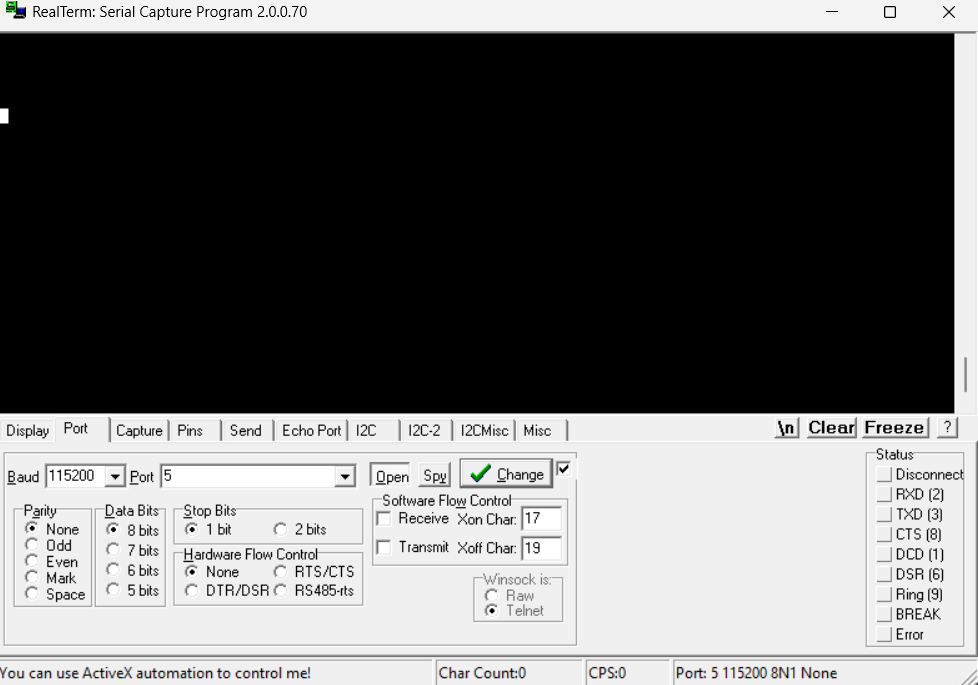
* Baud Rate: 115200
* Data Bit(s): 8
* Stop Bit(s): 1
* Parity: None
* Flow Control: None
* Endianness: Little (LSB first)

### Host To RoverGen2: *Command* Frame Format

The *Command* frame consists of the 4-byte preamble (0xDEADBEEF), command ID, mailbox data and the 8-bit CRC, for a total of **27 bytes**.

<table data-full-width="true"><thead><tr><th align="center">Byte #</th><th align="center">Byte Description</th><th align="center">Value</th></tr></thead><tbody><tr><td align="center">0</td><td align="center">Preamble XLSB</td><td align="center">0xEF</td></tr><tr><td align="center">1</td><td align="center">Preamble LSB</td><td align="center">0xBE</td></tr><tr><td align="center">2</td><td align="center">Preamble MSB</td><td align="center">0xAD</td></tr><tr><td align="center">3</td><td align="center">Preamble XMSB</td><td align="center">0xDE</td></tr><tr><td align="center">4</td><td align="center">Command LSB</td><td align="center"><a href="#ble-commands">Commands</a></td></tr><tr><td align="center">5</td><td align="center">Command MSB</td><td align="center"></td></tr><tr><td align="center">6</td><td align="center">Mailbox Byte 0</td><td align="center"></td></tr><tr><td align="center">...</td><td align="center">...</td><td align="center"></td></tr><tr><td align="center">25</td><td align="center">Mailbox Byte 19</td><td align="center"></td></tr><tr><td align="center">26</td><td align="center">8-bit CRC</td><td align="center"></td></tr></tbody></table>

### RoverHatGen2 To Host: *Command Response* Frame Format

The *Command Response* frame is solicited; it is generated on each received *Command* frame from the host.

It consists of the 4-byte preamble (0xDEADBEEF), the Command ID which generated the Command Response frame, the Response ID itself, IMU data, TOF distance data, and the 8-bit CRC, for a total of ~~**23**~~**&#x20;39 bytes**.

{% hint style="warning" %}
It is highly recommended that the Host await the *Command Response,* before sending any subsequent *Command* frames.
{% endhint %}

| Byte # |   Byte Description   |                 Value                |
| :----: | :------------------: | :----------------------------------: |
|    0   |     Preamble XLSB    |                 0xEF                 |
|    1   |     Preamble LSB     |                 0xBE                 |
|    2   |     Preamble MSB     |                 0xAD                 |
|    3   |     Preamble XMSB    |                 0xDE                 |
|    4   |      Command LSB     |       [Commands](#ble-commands)      |
|    5   |      Command MSB     |                                      |
|    6   |     Response LSB     | [Responses](#command-response-codes) |
|    7   |     Response MSB     |                                      |
|    8   |      Accel X LSB     |                 int16                |
|    9   |      Accel X MSB     |                                      |
|   10   |      Accel Y LSB     |                 int16                |
|   11   |      Accel Y MSB     |                                      |
|   12   |      Accel Z LSB     |                 int16                |
|   13   |      Accel Z MSB     |                                      |
|   14   |      Gyro X LSB      |                 int16                |
|   15   |      Gyro X MSB      |                                      |
|   16   |      Gyro Y LSB      |                 int16                |
|   17   |      Gyro Y MSB      |                                      |
|   18   |      Gyro Z LSB      |                 int16                |
|   19   |      Gyro Z MSB      |                                      |
|   20   |   TOF Distance LSB   |                uint16                |
|   21   |   TOF Distance MSB   |                                      |
|   22   | Motor 1 Current XLSB |                 float                |
|   23   |  Motor 1 Current LSB |                                      |
|   24   |  Motor 1 Current MSB |                                      |
|   25   | Motor 1 Current XMSB |                                      |
|   26   | Motor 2 Current XLSB |                 float                |
|   27   |  Motor 2 Current LSB |                                      |
|   28   |  Motor 2 Current MSB |                                      |
|   29   | Motor 2 Current XMSB |                                      |
|   30   | Motor 3 Current XLSB |                 float                |
|   31   |  Motor 3 Current LSB |                                      |
|   32   |  Motor 3 Current MSB |                                      |
|   33   | Motor 3 Current XMSB |                                      |
|   34   | Motor 4 Current XLSB |                 float                |
|   35   |  Motor 4 Current LSB |                                      |
|   36   |  Motor 4 Current MSB |                                      |
|   37   | Motor 4 Current XMSB |                                      |
|   38   |       8-bit CRC      |                                      |

### CRC Generation

The CRC appended to the *Command* and *Command Response* frames is an 8-bit XOR CRC:

{% code lineNumbers="true" %}

```c
static uint8_t calculate_xor_crc(uint8 *data, int length)
{
    uint8_t crc = 0;
    for (int i = 0; i < length; i++)
    {
        crc ^= data[i];
    }
    return crc;
}// calculate_xor_crc
```

{% endcode %}

The CRC is computed across the payload data of the frame, **EXCLUDING** the preamble.

For example: Bytes 4 to 25 of the *Command* Frame and bytes 4 to 21 of the *Command Response* Frame.

### UART Interface Debug

[RealTerm overview from Sparkfun.](https://learn.sparkfun.com/tutorials/terminal-basics/real-term-windows)&#x20;

Can be downloaded [here.](https://flex-controller-se.mantismc.com/flex-controller-se-edition/broken-reference)

<figure><img src="https://content.gitbook.com/content/tpXGY8yRGIrUmuuiav4P/blobs/jx3s5CTBHSXqApYJZ5Yp/image.png" alt=""><figcaption><p>Configure UART connection via <em>Port</em> tab. Click <em>Change</em> to apply.</p></figcaption></figure>

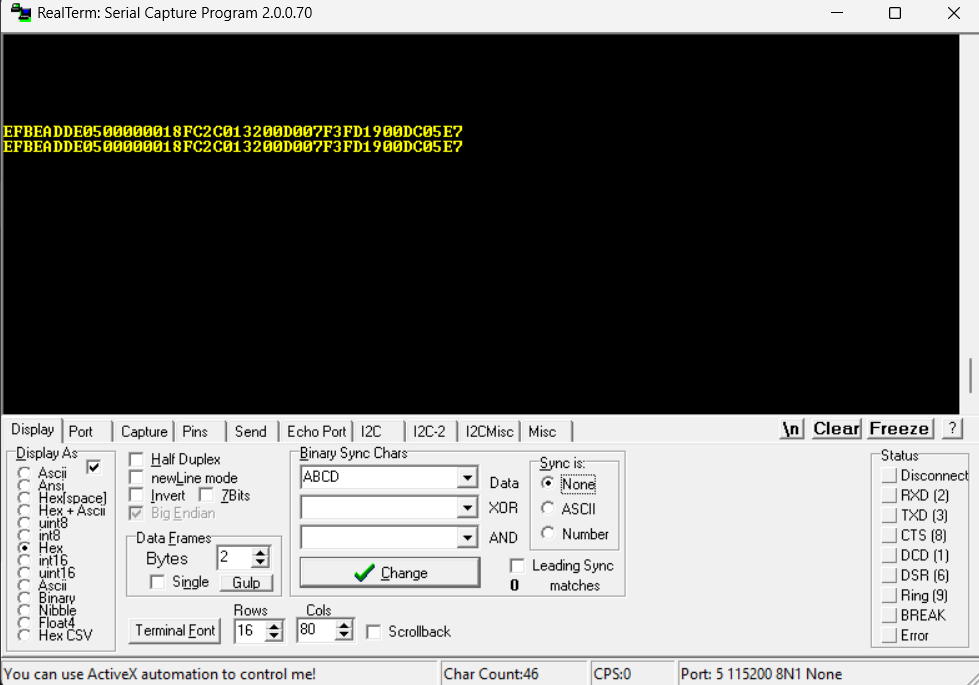
<figure><img src="https://content.gitbook.com/content/tpXGY8yRGIrUmuuiav4P/blobs/GeX27YODbOgw42iEe1Cj/image.png" alt=""><figcaption><p>Ensure <em>Hex</em> radio button is selected under <em>Display As</em>.</p></figcaption></figure>

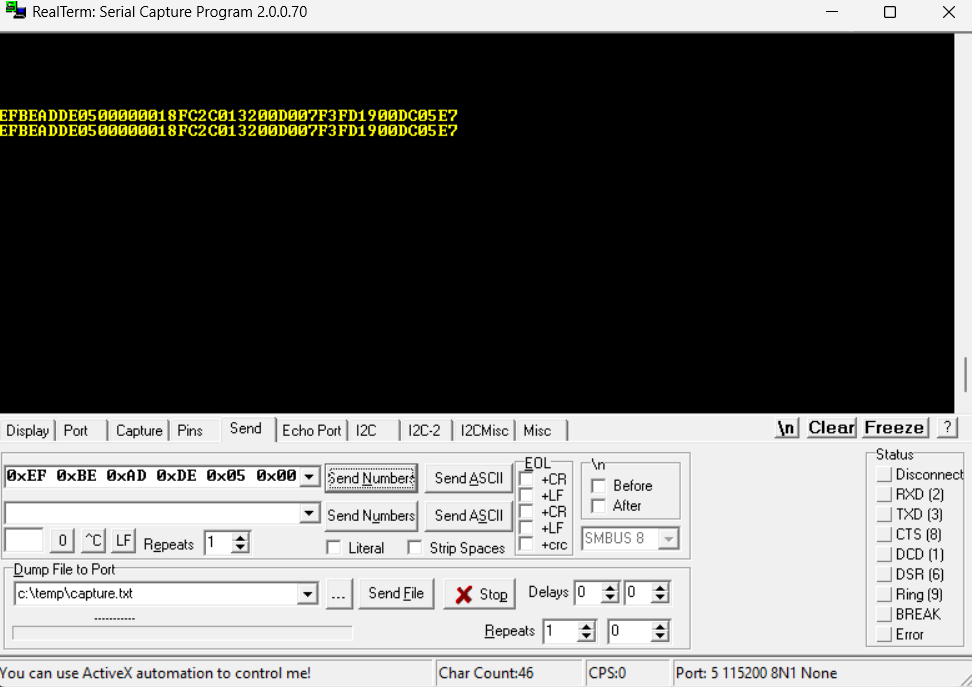
<figure><img src="https://content.gitbook.com/content/tpXGY8yRGIrUmuuiav4P/blobs/ptHS0O8m873GDsKqeUxn/Screenshot%202025-02-12%20114339.png" alt=""><figcaption><p>Paste hex data in either of drop-downs and click corresponding <em>Send Numbers</em> button.</p></figcaption></figure>

#### Set Motor 1 and Motor 2 Throttles (Command 0x0005) Example

* Motor 1 Throttle: 50 %&#x20;
* Motor 2 Throttle: -100%

{% code overflow="wrap" %}

```
0xEF 0xBE 0xAD 0xDE 0x05 0x00 0x32 0x9C 0x00 0x00 0x00 0x00 0x00 0x00 0x00 0x00 0x00 0x00 0x00 0x00 0x00 0x00 0x00 0x00 0x00 0x00 0xAB
```

{% endcode %}

#### Set All Motor Throttles (Command 0x0013) Example

Sets motors 1-4 to 100 % throttle.

{% code overflow="wrap" %}

```
0xEF 0xBE 0xAD 0xDE 0x13 0x00 0x64 0x64 0x64 0x64 0x00 0x00 0x00 0x00 0x00 0x00 0x00 0x00 0x00 0x00 0x00 0x00 0x00 0x00 0x00 0x00 0x13
```

{% endcode %}

#### Kill All Motors (Command 0x0007) Example

{% code overflow="wrap" %}

```
0xEF 0xBE 0xAD 0xDE 0x07 0x00 0x00 0x00 0x00 0x00 0x00 0x00 0x00 0x00 0x00 0x00 0x00 0x00 0x00 0x00 0x00 0x00 0x00 0x00 0x00 0x00 0x07
```

{% endcode %}

#### Set Motor 1 Throttle (Command 0x0003) Example

Sets motor 1 to 100 % throttle.

{% code overflow="wrap" %}

```
0xEF 0xBE 0xAD 0xDE 0x03 0x00 0x64 0x00 0x00 0x00 0x00 0x00 0x00 0x00 0x00 0x00 0x00 0x00 0x00 0x00 0x00 0x00 0x00 0x00 0x00 0x00 0x67
```

{% endcode %}

#### Set All Motor Throttles (Finite) (Command 0x0014) Example

* Motor 1: Unchanged
* Motor 2 : 100 % throttle for 5 seconds
* Motor 3: 50 % throttle, indefinately
* Motor 4: -25 % throttle for 10 seconds

{% code overflow="wrap" %}

```
0xEF 0xBE 0xAD 0xDE 0x14 0x00 0x00 0xFF 0xFF 0xFF 0xFF 0x64 0x88 0x13 0x00 0x00 0x32 0x00 0x00 0x00 0x00 0xE7 0x10 0x27 0x00 0x00 0x09
```

{% endcode %}

#### System Reset (Command 0x0015) Example

{% code overflow="wrap" %}

```
0xEF 0xBE 0xAD 0xDE 0x15 0x00 0x00 0x00 0x00 0x00 0x00 0x00 0x00 0x00 0x00 0x00 0x00 0x00 0x00 0x00 0x00 0x00 0x00 0x00 0x00 0x00 0x15
```

{% endcode %}